 Classroom Management
You tap a star forty times on a good day. Kindness, on task, helping a friend. By June that is thousands of taps, and until now the only thing they added up to was a number on a card.
Stats is the new page that keeps the record and makes it readable. Open any class, tap More, and pick Stats.
What you see
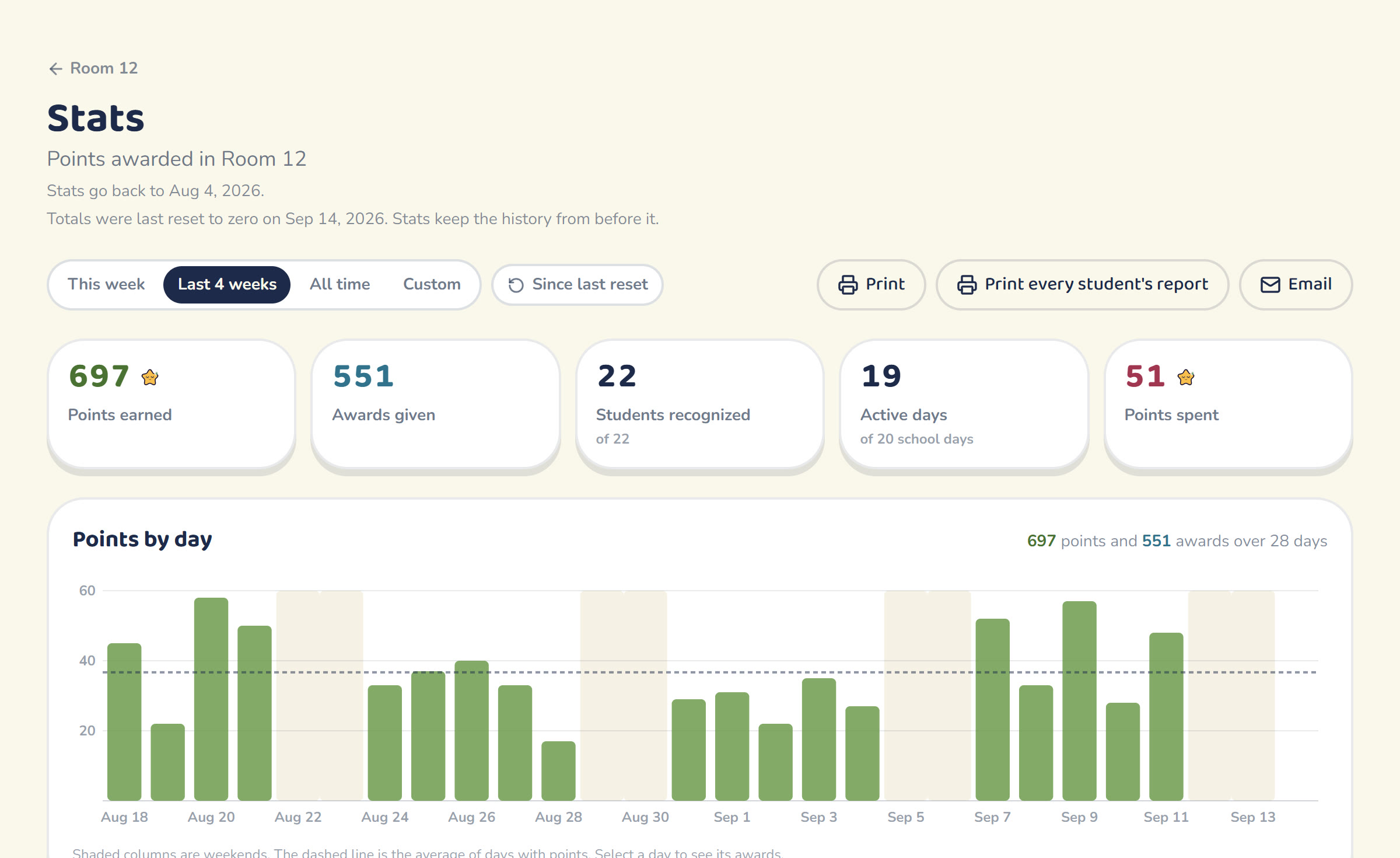
The top of the page answers the question most teachers ask first: is the system alive? Points earned, awards given, how many students got at least one, and how many school days had any points at all. If you awarded on 9 of 20 days, that number is right there.
Under it, a chart of points by day. Weekends are shaded. Click any bar and the day opens up beneath it, newest award first: the time, the student, the behavior, the points.
Then the part that tends to surprise people. Every behavior gets a bar, sized by the points it earned. Most teachers who look at this find one behavior doing most of the work and one they set up in August and never touched again. That is useful to know. If Kindness has 3 awards and On Task has 80, the class is learning what you actually notice.
A small pair of charts shows when points happen, by weekday and by hour of the day. Quiet Fridays and empty afternoons show up plainly.
The list worth checking on a Friday
Positive-only systems have one failure mode, and it is quiet. The student who is never a problem and never a standout goes weeks without a point, and nobody notices, because there is nothing to notice.
Stats keeps a short list called "Students you haven't recognized lately." It starts with anyone who earned nothing in the range you are looking at, then the students with the fewest awards. It is a reminder for you, sized to fit a Friday afternoon. The class never sees it, and it disappears on its own once everyone has been recognized.
A report you can hand to a family
Click any student and the page becomes their report: points earned, awards, current total, points spent on rewards, their own chart, what they earned points for, and a dated list of every award. It is written to be read by a parent, so it says things like "Maya earned 42 points across 31 awards on 18 different days."
Nothing about any other student is on it. The report is built only from that student's own points, which is the same rule the rest of Chou Chou Teach runs on.
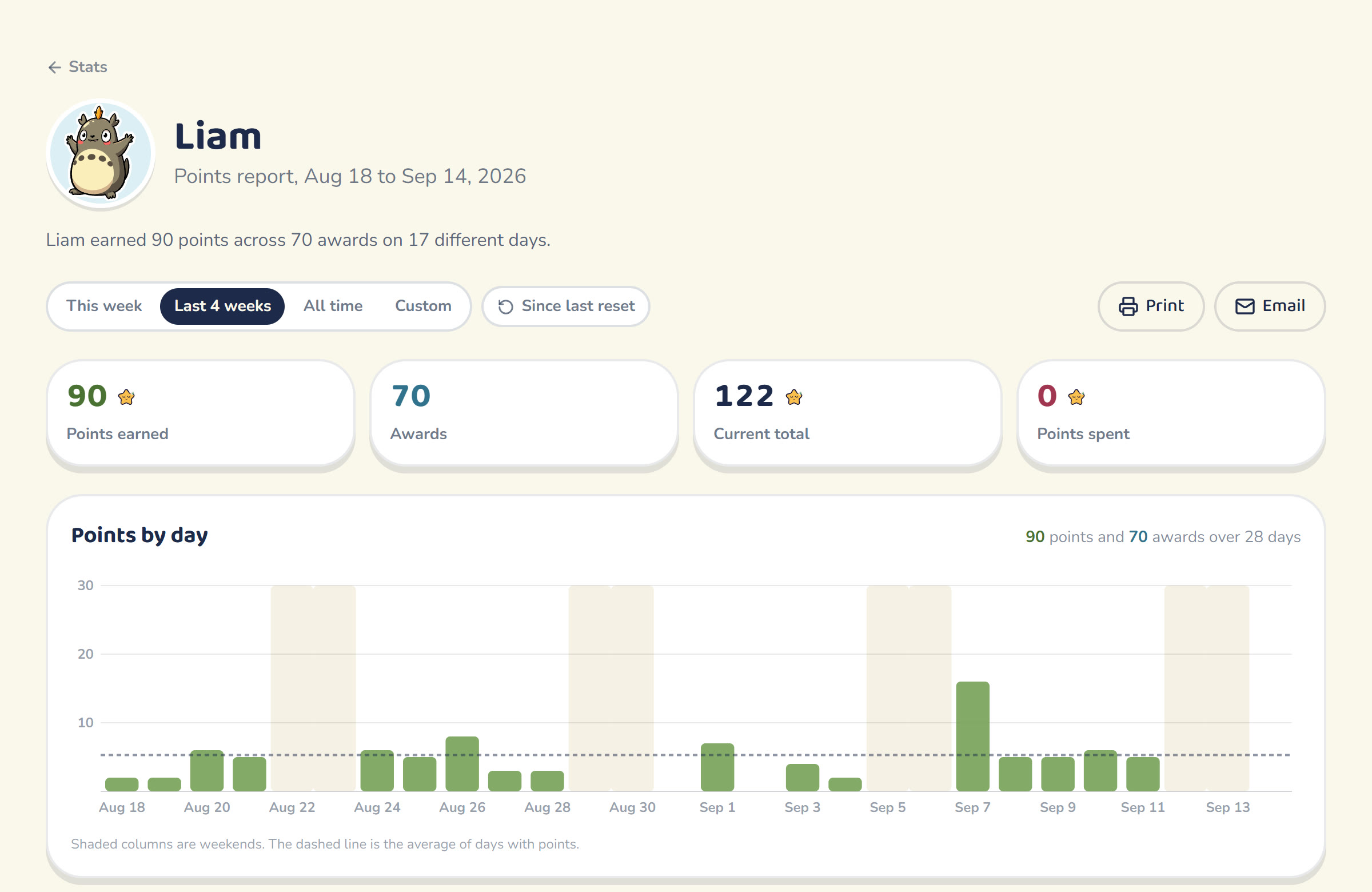
Print it, and the teacher-only controls drop away. Email it, and the message goes out with your address as the reply-to, so a parent who writes back reaches you. We do not keep the address you type. For conference week there is also "Print every student's report," which prints the whole class, one page per student.
Resets no longer erase anything
Plenty of teachers reset points every Friday, and until today that deleted the week's awards for good. It made Stats impossible, so we changed how reset works.
A reset now sets the running total on the class screen back to zero and leaves the awards in place. Stats reads the whole history by default. When a class has had a reset, a "Since last reset" switch appears in the Stats toolbar. Turn it on and every number on the page counts only points since each student's last reset, which matches what the class sees on the board. Turn it off and you are back to the full picture.
Resets made before September 14, 2026 already deleted their awards, so a class from last spring starts its history at the first award that survived.
Where to find it
Any class, More, then Stats. It is on the web and in the iOS app today, and co-teachers can open it too. Stats reads your data and never writes any, so it works even on a lapsed trial. Emailing a report needs an active plan.
If something on the page does not match what you expected to see, reply to any of our emails or write to support@chouchouteach.com and tell us what you were looking for.
Frequently asked questions
Where do I find Stats?
Can students or parents see the Stats page?
Does resetting points erase my stats?
What is in a student's report?
How far back does Stats go?

The Chou Chou Team
Classroom Coaches
We build privacy-first tools that help K-12 teachers run warmer, calmer, more positive classrooms.